Member Custom Builds
4 topics in this forum
-
Creation I did for Memorial Day
-
- 2 replies
- 418 views
- 1 follower
-
-
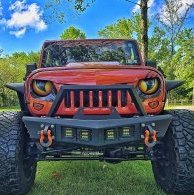
Which do you prefer? I was always a smaller wheel more rubber type of guy. Last year I wanted to change up the look of the Beast a little. New front bumper and a little larger wheels. Currently had 17s wrapped in 37x12.50. I came across these 22s wrapped in 37x13.50 and couldn't pass.upmthe marketplace deal. They are still growing on me but I do like them for the shows in the summer. I go back to the 17s for the winter.
-
-
- 9 replies
- 495 views
- 1 follower
-
-
2009 JKU 1 of 1106 Sunburst Orange Pearls made. 1/1 from factory although its not factory anymore 3.8 v6 with 6sp manual trans. 215,000 plus mile daily driver, show jeep and off loader (sometimes)inbound2780188602302741362.mp4 4.5 Clayton short arm, eagle eye grill, custom blackout airbrushed eyes (1st jk to have them over 12 years now) cowl hood (had the dv8 avenger hood but rotted out), summer has 22" wheels wrapped in 37x13.5 tires, overhead soundboard, 2 12" subs, antirock sway bar, 4:88 gears Over 100 awards including 1st place Jeep both times i attended Carlisle Chrysler Nationals, Best Jeep Bloomsburg 4x4 Nats, 1st place Myrtle Beach Jeep Jam, best of show Se…
-
- 2 replies
- 261 views
- 1 follower
-
-