





Mark
Admin
-
Joined
-
Last visited
Everything posted by Mark
-
This is now US, we are Here... Trump is eerily quiet... Obama isnt...other presidents arent... This is definitely not normal Trump... The Office of the Former President of the United States ? What? We know he studied the elections in 2018 for foreign involvement the key to most of the laws he can enact are foreign involvement which we have plenty of proof of now... Mike Lydell video demonstrates... just how much... Now back to Kim his reference to two presidents... odd.. possibly right now. The impeachment between the terms also correct...? Sure seems like it... The Ability for Trump to Have invoked the Insurrection act... Foundational requirements are and have been all met... If the insurrection is perpetuated by foreign entities and they are also working with locals and politicians- you cant exactly use the most normal means... Biden just signing away as if to get as much into play just in case... Kim states that there will be a dark season, and Biden called this winter a dark winter, then Kim mentions a Change of season to the spring and all would be revealed...(about what?) I think I know what they mean... but why is God involved with our country...? Does he call the new land his country? I know he does according to the scholars but thats just interpretation right?
-
And at the judiciary branch, if a court case challenging the President's use of the Insurrection Act rises to the Supreme Court, they could rule that the act is being used improperly and request that the military actions stop. But there would already need to be a case headed there, currently there is only election fraud headed to the courts...
-
At the legislative branch, a normal piece of legislation would stand in a president's way. Because the Act is already a legislative action, NOT a part of the Constitution, Peck says it's possible for the House and Senate to remove the president's authority to invoke. If the Impeachment works this would be the same thing... without having to admit to the public the insurrection act had in fact been signed... or if they were unaware because it was targeting the corruption all of them are involved in... Trump always said he would run to save the Country if he had to because things got so bad... still sounds accurate for me...
-
How to stop it ... Pay close attention... At the executive branch, the vice president and the cabinet could invoke the 25th Amendment. This allows the vice president to instead take over all presidential duties, meaning the president's use of the Insurrection Act would be halted. Nancy was sure eluding to this one big time...right after her laptop came us missing and they attempted to pin all the violence on Trump... Even though all summer long people were encouraged to riot and protest because its their right even to steal if need be...
-
There is an essential first step if a president decides to unilaterally invoke the Insurrection Act. He must issue a public proclamation declaring his intent to invoke. "This public proclamation basically asks those who are the insurgents to cease and desist and go back to their homes peaceably, and give them the opportunity to do that." Peck says that alert also gives the checks and balances system to kick in. Pay attention to that last part... Trump did that twice once with the protesters in Oregon and the other at the Capital...
-
The principle that the military should not act as a domestic police force, known as “posse comitatus,” has deep roots in the nation’s history, and it is often mistaken for a constitutional rule. The Constitution, however, does not prohibit military participation in police activity. Nor does the Posse Comitatus Act of 1878 outlaw such participation; it merely states that any authority to use the military for law-enforcement purposes must derive from the Constitution or from a statute. The Insurrection Act of 1807 provides the necessary authority. As amended over the years, it allows the president to deploy troops upon the request of a state’s governor or legislature to help put down an insurrection within that state. It also allows the president to deploy troops unilaterally, either because he determines that rebellious activity has made it “impracticable” to enforce federal law through regular means, or because he deems it necessary to suppress “insurrection, domestic violence, unlawful combination, or conspiracy” (terms not defined in the statute) that hinders the rights of a class of people or “impedes the course of justice.”
-
Economic powers might sound benign, but they are among the president’s most potent legal weapons. All but two of the emergency declarations in effect today were issued under the International Emergency Economic Powers Act, or ieepa. Passed in 1977, the law allows the president to declare a national emergency “to deal with any unusual and extraordinary threat”—to national security, foreign policy, or the economy—that “has its source in whole or substantial part outside the United States.” The president can then order a range of economic actions to address the threat, including freezing assets and blocking financial transactions in which any foreign nation or foreign national has an interest.
-
Here is a Case an Point of what I writing about I just happened upon it so its fitting... Nonetheless, some legal scholars believe that the Constitution gives the president inherent emergency powers by making him commander in chief of the armed forces, or by vesting in him a broad, undefined “executive Power.” At key points in American history, presidents have cited inherent constitutional powers when taking drastic actions that were not authorized—or, in some cases, were explicitly prohibited—by Congress. Notorious examples include Franklin D. Roosevelt’s internment of U.S. citizens and residents of Japanese descent during World War II and George W. Bush’s programs of warrant-less wiretapping and torture after the 9/11 terrorist attacks. Abraham Lincoln conceded that his unilateral suspension of habeas corpus during the Civil War was constitutionally questionable, but defended it as necessary to preserve the Union. So in fact he can even take unprecedented steps and clearly has full authority to do so... I bet he would.... if ya know Trump... How else could you remove the corruption if they get a vote on it- we see their corruption when its anything Trump as it is...
-
They seem to think he could, and lets put a little perspective to this all... We know Trump initiated the Emergency declaration for Covid- we even know he could now send in the feds to help the states if requested... He could have done it also under the insurrection act... which permits the president to protect the citizens of all groups from harm and danger from lack of from said state (Basically) He waited until requested - he did not over reach... But now with the emergency declaration in effect... this also means he could in fact prevent the people involved in the insurrection of the coup attempt to overthrow our democracy and the US Constitution... Maybe...
-
Here is an atricle that is anything but Trump and see what they comment about the use of a State of emergency... We also know Trump signed one for DC through March now from what I understand... March is important in a variety of ways...Ill cover that later...kinda why we are here now... What Can a President Do During a State of Emergency? - The Atlantic WWW.THEATLANTIC.COM From seizing control of the internet to declaring martial law, President Trump may legally do all kinds of extraordinary things. The moment the president declares a “national emergency”—a decision that is entirely within his discretion—more than 100 special provisions become available to him. While many of these tee up reasonable responses to genuine emergencies, some appear dangerously suited to a leader bent on amassing or retaining power. For instance, the president can, with the flick of his pen, activate laws allowing him to shut down many kinds of electronic communications inside the United States or freeze Americans’ bank accounts. Other powers are available even without a declaration of emergency, including laws that allow the president to deploy troops inside the country to subdue domestic unrest. This edifice of extraordinary powers has historically rested on the assumption that the president will act in the country’s best interest when using them. With a handful of noteworthy exceptions, this assumption has held up. But what if a president, backed into a corner and facing electoral defeat or impeachment, were to declare an emergency for the sake of holding on to power? In that scenario, our laws and institutions might not save us from a presidential power grab. They might be what takes us down.
-
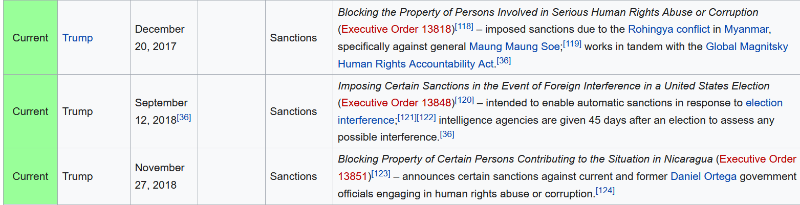
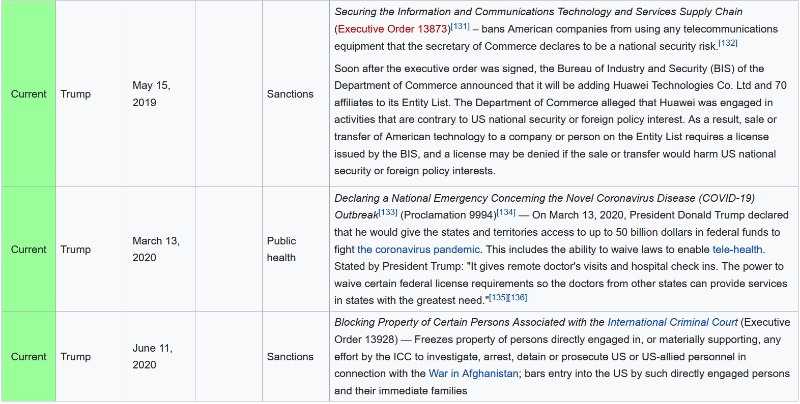
When reading that pay attention to Arron Burr trying to raise an army to take over the Government... 🙂 Ill help Madison replied back with this nugget... “It does not appear that regular Troops can be employed, under any legal provision agst. insurrections,” wrote Madison, “but only agst. expeditions having foreign Countries for the object.” Also note the following section... “Jefferson was looking for a legitimate source of authority on Burr’s plot and he was willing to believe Wilkenson, even though historians suggest that Jefferson knew darn well that Wilkenson was a liar with his own suspect reputation,” says John Fea, a history professor at Messiah College. “But Jefferson needed a source to move the gears to try to stop Burr, who was his biggest fear.” So they heard a Plot... in Burrs case he was raising an army.... but (Like election Fraud)... They needed some sort of proof.... (Back Obama and Hillary and most democrats were claiming foreign interference... Hey wait That ties into the Insurrection act requirement) Trump looks like he approved it to find out and in the event there was Proof then they would act on the power the President have provided to them to act on this behalf... hmmm sounds like Trumps thinking to me and it all fits in pretty soundly and perfectly... Ok so here is what the Media says about this... The Insurrection Act of 1807 allows the president to deploy the military on U.S. soil to stop an insurrection or violent uprising. The president first needs to make a public proclamation of it's invocation. The three branches of government — the executive, legislative and judiciary — all have the ability to halt the president's use of the act if they deem it improper. In the paragraph above I wonder if they are the ones planning the insurrection if you would still be required to notify them... In this instance I would say that the heads of the departments like Homeland Security the NSA and others would act sufficiently on their own until order was restored... then returning the power back to the acting president... Ok So I want to say Trump claimed he initiated a State of emergency over the riots... Well the following is a list of Trump Emergency Declarations... Notice the ones still active... Make one wonder a bit...
-
So we hear all the experts about the elections and we know Trump did in fact sign the EO... What that does legally... Gives the power in the event this did actually occur to the heads of the individual departments to prevent the overthrow of our constitution and way of American Life... Well I think we have enough proof to say that occurred...the election and all...Now you have seen a lot more now than election night... Next we are seeing Trump very quiet... We also heard Trumps words he said peacefully and the media keeps distorting it the time line is also in question with news reports comming out showing activity as early as 7:30 or 8:30 am that day and there was a mob already gathering down at the capital while Trump was speaking approx 35 mins before he got done, he had run over in his time slot... On whether or not Special forces took the laptops and computers... I saw two men in solid black with mask in a video where Trump supporters inside were yelling Antifa Antifa and the one guy (also note they both had front packs and back packs on their bodies as though they were there for a reason and they may have the devices inside) he grabs the one guy and yells I told you we are not antifa shut up and leave us alone...then they both ran ahead and were gone... Sounds exactly like SF guys to me and they way they would infiltrate and get in... also this fits into the well one half of the upper government aware these events were going to happen- so input a couple sf guys-let them gain access easily inside...You know the reps are all safe in bunkers and devices will be left out because its SOP for a breech...(leave everything we have to get you out immediately you could be hurt) then the lack of police inside or secret service and the police leading people- That video of the black cop kinda acting like he is directing the people-well he is, he was leading the group away from the chambers and towards a safe exit... hmmm. So is that possible Yep... There is also a report a woman stole Nancys laptop and was trying to sell it to Russians... (media Version) doesnt say if they have the laptop the feds have it or what... We leave that there... no consideration either way- it makes no difference on the larger picture though it would lend a bit more to the prevention of the overthrow of our country... In relation to everything at the Capital we see all the added security... We see an Inauguration that doesnt seem normal in anyway... reports its in side a studio and all that... for now I say DC was live just weird... This one also we kinda leave as to it doesnt matter for now either way... but what if is there... definitely nothing like anything ever before in history... Did Trump Invoke the Insurrection Act ? How would we know? Ok I suggest That is very highly possible... and I will suggest something here... That we keep iin mind just as I am writing this other people are reporters and their lack of investigation or complete thoroughness is like mine who knows right? So keeping that in mind I will try to explain why I think this is possible and could be exactly where we are at this time in the universe... Here goes... When you search for the Insurrection act you get a lot of files from the Invoking in 1807 to the requirements to enact it and even claims Trump did in fact enact it... Lets dig in a bit and see what we can determine as accurate about all three... Step one the history of the insurrection act in the United States... What Is the Insurrection Act? - HISTORY WWW.HISTORY.COM With his political career in ruins after killing Alexander Hamilton, Aaron Burr set off to claim lands in the Southwest—and President Jefferson intended to stop him.
-
So you see the video of the what I consider a twitchy kinda guy, whos habit or hobby is to deciefer the bible and cryptic messages with what I estimate to be a clear understanding at least from his point of view- these events... However the only problem I kept having with all of this was... He seems spot on... What do you think... The mere fact that the words he is decoding and time line he is showing well none of that is his words... Also key into these were statements made over yrs all prior to any of these never before events occurring in our lives... And the exact way the time line is laying over our current time in the universe...(no im not going Alien- Im not Simon Parkes ) However, just like we said about Q some things just cant be ignored, and after seeing the bible version of the Q explained I lean more towards we may just actually be living in the scriptures right this minute...well we always have havent we... 🙂 So, we have all these predictions from a man who died the week before Trump takes Office... He also remarks why God ? Why now ? Why not closer to the events as they will unfold ? He said the lord told him not to mind the reason take the notes...Basically... Maybe because he would die before Trump entered Office? Well lets add that to the weird pile.... Next we Have Trump- In the beginning, I didnt hear as much - Thanks to God- From a man who said Grab Women by their (Special Place) to a Man Saying Prayers defending Isreal and moving the Capital... Being a fighter for religion across the country and the Globe... Yea He did doo that... To know he is a messenger from God- I mean Kim says that Trump will lead the prayer for the christians... Thats occurring and ongoing... Im willing to lean in a tad after all the past stuff I just laid out... I mean remember Id rather error on good than evil... Well Ill accept maybe I have been mistaken in a lot of the beliefs I grew up with...being raised Catholic didnt help... So lets get to where we are now in all of this... We all saw what appeared to be a massive Voter Fraud - Biden spoke about it in his own words... Could it be a froidian Slip - about real events? or is it a harmless miss statement (which is Plausible) Who knows... but he did say it... We saw the out pouring of normal people like you and I come out of the woodwork claiming fraud... Yet only two courts to date have permitted any evidence to be entered in- they are now proceeding forward and another I think Arizona is now also going to hold some more hearings, so at least thankfully this part of election corruption and machines isnt over yet... I hope it ends they way we all saw what was happening so we can trust our elections again... The only problem currently would be not to address the problems and we all lose, all voters lose why bother anymore after that if nothing changes... So we got through all that... Here are some things to add for fluff we Can prove... Ok The Executive order Trump Signed on 9/12/2018 to secure the Elections and declaring a National Emergency... Imposing Certain Sanctions in the Event of Foreign Interference in a United States Election WWW.FEDERALREGISTER.GOV Search, browse and learn about the Federal Register. Federal Register 2.0 is the unofficial daily publication for rules, proposed rules, and notices of Federal agencies and organizations, as well as executive orders and other presidential documents. If you saw and read that you will see a few mentions of Emergency disaster National and economic security and even immigration is all addressed... Trump is not a good loser- in fact I never heard him admit defeat and def not in this election cycle in fact quite the contrary... Then Crickets... So he placed all this in play way back two yrs before... Why is this important ? Because when you see a film like Mike Lyndell puts out showing the Heads of the NSA Homeland security and all claiming they had witnessed in 2018 the elections tracked the data from election facilities to overseas locations skytle and Smart-matic mentioned and Dominion and the other one slips my mine at the moment but its the machines they use in Texas and most other places in the country that do not run Dominion... It gives those stories credibility... and the fact these are forensics guys the government uses everywhere else but they dont want them poking into elections... Wonder why? lol Ok still more to continue to build up to why I think we are going to see something epic soon...
-
Ok clearly whats a bit off, is how quiet the President has been... Other than dropping out of the Screen Actors Guild nothing hardly at all except him renouncing the Patriot Party as they claimed he was starting... He refuted and stated he would remain a Republican. But back on point a bit. The fact that Kim predicts these things makes you scratch your head to say the least... And more so, the mention of Two Presidents, the time line of the prophecies and the events in modern day we are seeing. Well even would shake the belief of non believers, much like myself who never really thought God was real, Im not Atheist I just always wanted some shred of proof the whole faith thing, when to be honest most people who realize we all die no matter what would want to have happy thoughts about their own mortality rather than fire brimstone and agony...lol Ok, so as one of the I believe in science and how come there couldnt be a bit of both involved here God controlling the science kinda thoughts... I would rather error on the good side and be wrong (being a decent person doing more good than bad) then error the opposite direction and burn for infinity... Thats kinda a long time. So back on track here- (just letting you see I was objective in the conclusions I have arrived at)... So we see a Man who speaks as though its gods message through him to assist us... In this message he mentions things that never have occurred in history that we know of... He speaks of Impeach Impeach they will try twice- Never happened before- He says Trump will not fall to the fake impeachments-So far he hasnt and this last one looks flawed for now- (I would look for the Dems to try tooth and Nail to get something as a conviction- they do not want Trump to be able to ever hold a public office again) Thats pretty pissed... Also, if you think as they do, they would try to break the pattern they seem locked into according to Kim... If they could some how change that outcome would that change the then projected future? Is that possible? We hear the man speak of how during times of struggle and misery- It brings more souls to God- Sounds kinda twisted maybe God works in mysterious ways sounds better- either way... I would also agree this is happening now right now outside the window... Then we also see the pause in the middle as pointed out in the video of the time line prediction and the events occurring were are discussing right now... Makes one wonder what exactly is going on... Another point that sticks out well because its even pointed out but if you think about it... The Two Presidents remarks and the one in particular with two minds... Biden possibly? Then they comment on They will say Trump The president doesnt speak enough... he is silent... CNN even made a jab at Trump claiming he has been so quiet... Thats very strange and odd for Trump he is the opposite... Now, this reminds me of when the first few times I heard Kim Clements and about what exactly he was saying and the orders that he preached different topics... I also heard the one when he described The president would be silent and the people would say why is he so quiet... right... I even remember thinking wow he missed that one by a mile the president never shuts up... but I was clearly off the time line for what he was saying verses what I thought... Thinking back now this clicked into place for me and it was enough I said let me take a deeper look into some of these topics...
-
https://www.facebook.com/GodInANutshellProject/videos/302433901130080
-
Absolute Proof MICHAELJLINDELL.COM Absolute Proof Please share with everyone you know to save our country! Watch on OAN Feb 5th @ 1pm, 4pm & 7pm EST Use Promo Code PROOF Share on facebook Facebook Share on twitter Twitter Share on reddit Reddit Share on linkedin LinkedIn Share on email Email
-
BonginoReport RUMBLE.COM BonginoReport's videos on Rumble.com
-
Gov. Noem SILENCES Reporters, Hands Out Facts on Biden They Refuse to Print RUMBLE.COM South Dakota Gov. Kristi Noem is absolutely fantastic!
-
Congrats... 🙂
-
Giuffre v. Maxwell, 1:15-cv-07433 – CourtListener.com WWW.COURTLISTENER.COM Docket for Giuffre v. Maxwell, 1:15-cv-07433 — Brought to you by the RECAP Initiative and Free Law Project, a non-profit dedicated to creating high quality open legal information.
-
Check that one out... 🙂
-
Yes, bitcoin could be the new GameStop WWW.CNBC.COM The price of bitcoin has been volatile the last few months. Skeptics worry it's a bubble, but Wall Street giants such as Citi and JPMorgan see room to run.
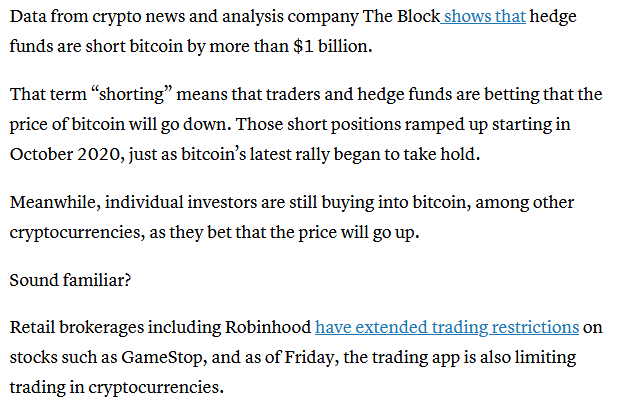 Newsmax host cuts off MyPillow guy Mike Lindell, anchor walks off set RUMBLE.COM So, you thought Newsmax was different?Jeff Bezos To Step Down As Amazon's CEO WWW.NPR.ORG Amazon's CEO will be Andy Jassy, the head of its cloud computing division. "As much as I still tap dance into the office, I'm excited about this transition," Bezos says.

Important Information
This is New takes only a second its about all of us and respect..Have at it...:) and Welcome...